" width="544.0252304077148px"><path d="M 134.25 0 C 208.394 0 268.5 60.106 268.5 134.25 C 268.5 208.394 208.394 268.5 134.25 268.5 C 60.106 268.5 0 208.394 0 134.25 C 0 60.106 60.106 0 134.25 0 Z" fill="rgb(1, 20, 24)" height="268.5px" id="yN8vm1Hrx" transform="translate(138 136.58)" width="268.5px"/><path d="M 0 20.006 C 0 8.957 8.957 0 20.006 0 L 20.006 0 C 31.055 0 40.013 8.957 40.013 20.006 L 40.013 60.019 C 40.013 71.068 31.055 80.025 20.006 80.025 L 20.006 80.025 C 8.957 80.025 0 71.068 0 60.019 Z" fill="rgb(1, 20, 24)" height="80.02523046666083px" id="shHSoeOt9" transform="translate(252 0)" width="40.01261523333051px"/><path d="M 0 20.006 C 0 8.957 8.957 0 20.006 0 L 20.006 0 C 31.055 0 40.013 8.957 40.013 20.006 L 40.013 60.019 C 40.013 71.068 31.055 80.025 20.006 80.025 L 20.006 80.025 C 8.957 80.025 0 71.068 0 60.019 Z" fill="rgb(1, 20, 24)" height="80.0252304666609px" id="f_wgo_K4w" transform="translate(252 480)" width="40.01261523333051px"/><path d="M 70.733 42.44 C 78.546 50.253 78.546 62.92 70.733 70.733 L 70.733 70.733 C 62.92 78.546 50.253 78.546 42.44 70.733 L 14.147 42.44 C 6.334 34.627 6.334 21.96 14.147 14.147 L 14.147 14.147 C 21.96 6.334 34.627 6.334 42.44 14.147 Z" fill="rgb(1, 20, 24)" height="84.87957469348834px" id="yd7tGmc9p" transform="translate(399.513 400.699)" width="84.87957469350249px"/><path d="M 70.733 42.44 C 78.546 50.253 78.546 62.92 70.733 70.733 L 70.733 70.733 C 62.92 78.546 50.253 78.546 42.44 70.733 L 14.147 42.44 C 6.334 34.627 6.334 21.96 14.147 14.147 L 14.147 14.147 C 21.96 6.334 34.627 6.334 42.44 14.147 Z" fill="rgb(1, 20, 24)" height="84.87957469348827px" id="L5H_XKlqs" transform="translate(60.412 75.598)" width="84.87957469350272px"/><path d="M 0 20.006 C 0 8.957 8.957 0 20.006 0 L 60.019 0 C 71.068 0 80.025 8.957 80.025 20.006 L 80.025 20.006 C 80.025 31.055 71.068 40.013 60.019 40.013 L 20.006 40.013 C 8.957 40.013 0 31.055 0 20.006 Z" fill="rgb(1, 20, 24)" height="40.01261523333062px" id="u2pqvCVt4" transform="translate(464 260) rotate(180 40.013 20.006)" width="80.02523046666101px"/><path d="M 0 20.006 C 0 8.957 8.957 0 20.006 0 L 60.019 0 C 71.068 0 80.025 8.957 80.025 20.006 L 80.025 20.006 C 80.025 31.055 71.068 40.013 60.019 40.013 L 20.006 40.013 C 8.957 40.013 0 31.055 0 20.006 Z" fill="rgb(1, 20, 24)" height="40.01261523333039px" id="aMBcd6Ugf" transform="translate(0 260) rotate(180 40.013 20.006)" width="80.02523046666079px"/><path d="M 42.44 14.147 C 50.253 6.334 62.92 6.334 70.733 14.147 L 70.733 14.147 C 78.546 21.96 78.546 34.627 70.733 42.44 L 42.44 70.733 C 34.627 78.546 21.96 78.546 14.147 70.733 L 14.147 70.733 C 6.334 62.92 6.334 50.253 14.147 42.44 Z" fill="rgb(1, 20, 24)" height="84.87957469348827px" id="e3VHiSnuY" transform="translate(392.513 75.598)" width="84.87957469350249px"/><path d="M 42.44 14.147 C 50.253 6.334 62.92 6.334 70.733 14.147 L 70.733 14.147 C 78.546 21.96 78.546 34.627 70.733 42.44 L 42.44 70.733 C 34.627 78.546 21.96 78.546 14.147 70.733 L 14.147 70.733 C 6.334 62.92 6.334 50.253 14.147 42.44 Z" fill="rgb(1, 20, 24)" height="84.87957469348834px" id="lsZHVEVAz" transform="translate(60.412 400.699)" width="84.87957469350272px"/></g></svg>)
What happens when a device outlives its own software?
A sous vide app as a proof of concept for restoring unsupported hardware
Category
toC web app
Dates
June 2025 - Aug. 2025
Market
France
Role
Product Designer
BRIEF
A working proof of concept.
Back Market wanted to go beyond their existing trade-in device service and take a public stance on software obsolescence. To make that position tangible, they needed a proof of concept — a working app that could restore an unsupported smart device and be demoed live at a major tech media forum in Paris.
I designed the end-to-end MVP flow of a sous vide app for Anova Precision Cooker, covering device connectivity flows, the cooking control interface, and the overall product narrative. The goal was to shape a sustainability argument into something people could hold and interact with.
DISCOVERY
Choosing the right device to prove the concept.
Not every abandoned smart device makes a viable proof of concept. The Anova Precision Cooker was selected for three reasons : Feasibility, clarity of use case, and the matching narrative.
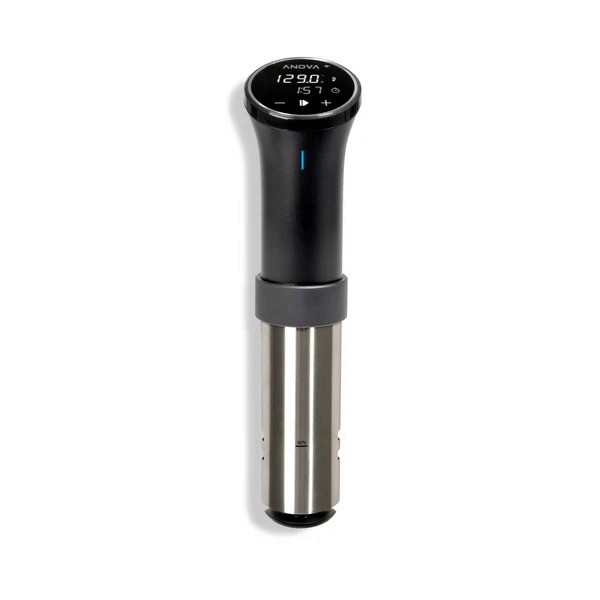
What is Anova Precision Cooker?
IoT-connected kitchen appliances specializing in sous vide (under vacuum) precision cooking
DESIGN DECISION 01
Finding the right entry point within the existing Back Market app.
This feature needed to live inside the existing Back Market app, not as a standalone product. Back Market's app is a marketplace — people come there to buy and sell devices. Placing a sous vide controller in that context required careful integration to avoid friction.
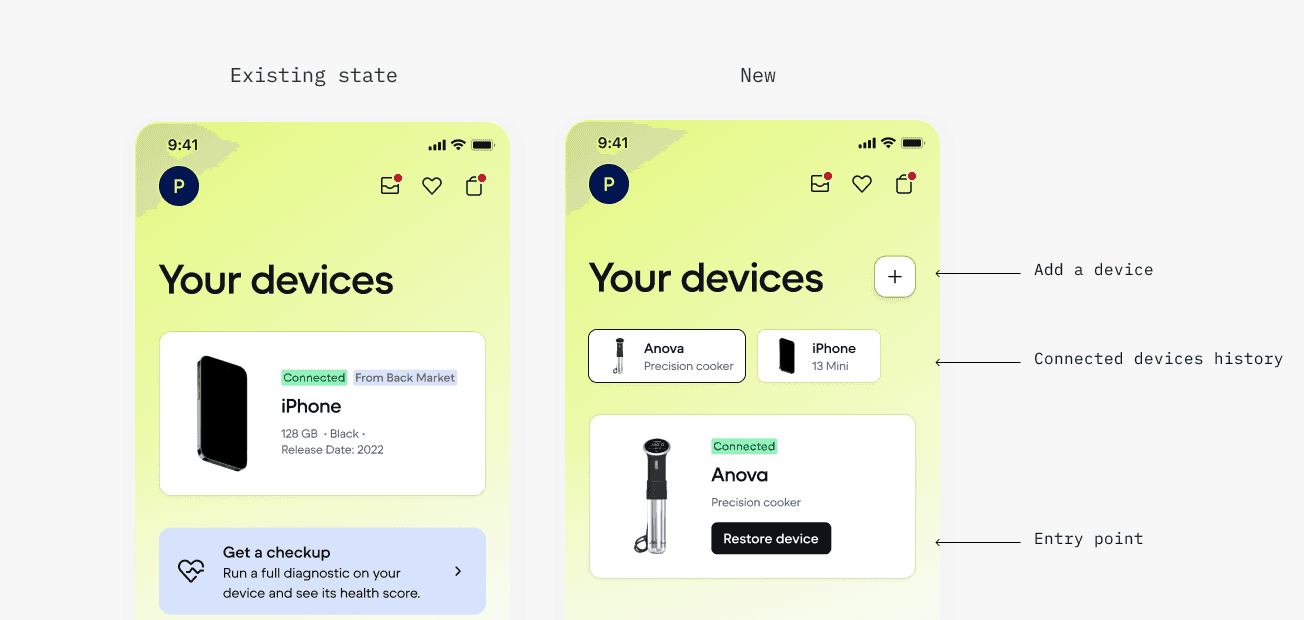
I studied the existing information architecture and identified the "Your Devices" section as the natural home. When a user registers a refurbished smart device, this is where it lives. Adding a "Restore this device" action here extends the existing mental model: you bought it here, you manage it here, you can revive it here.
This approach also avoided creating a separate app or navigation branch, which would have fragmented the experience and undermined the core message — that restoring software is simply another part of Back Market's offering.
DESIGN DECISION 02
Conceptualizing a control interface for slow, precise cooking.
Sous vide cooking is about precise water temperature over time. The design challenge was giving users clear, useful feedback for a process that is inherently slow and low-intervention.
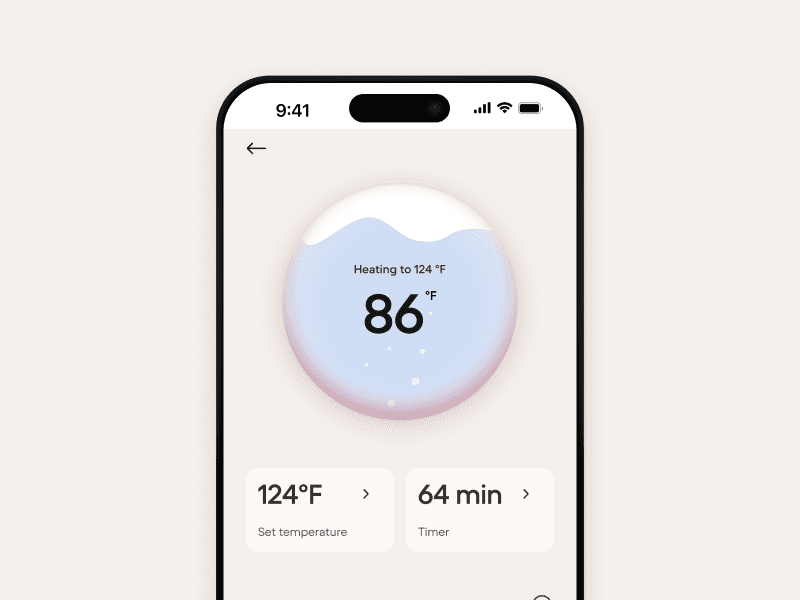
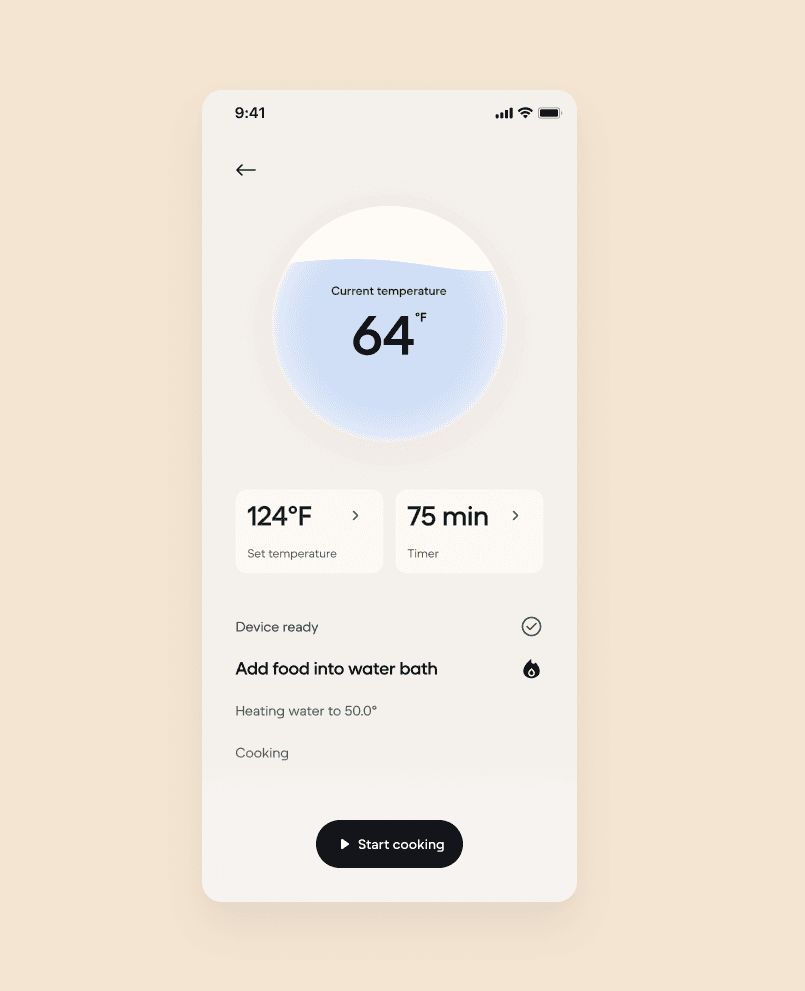
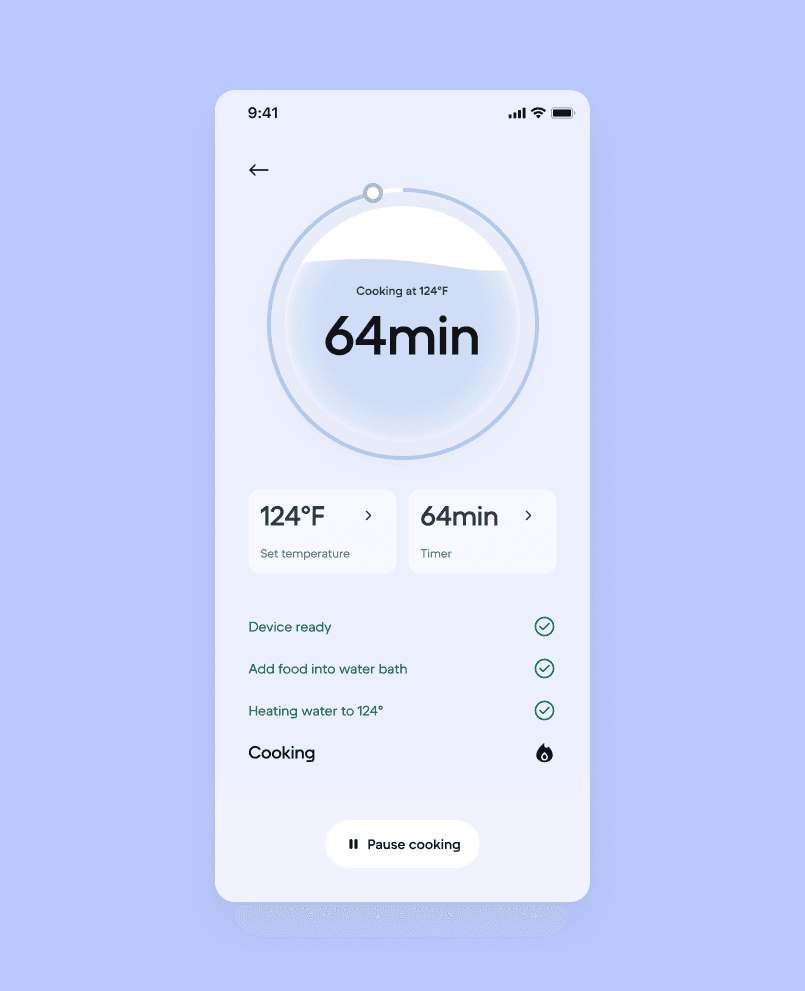
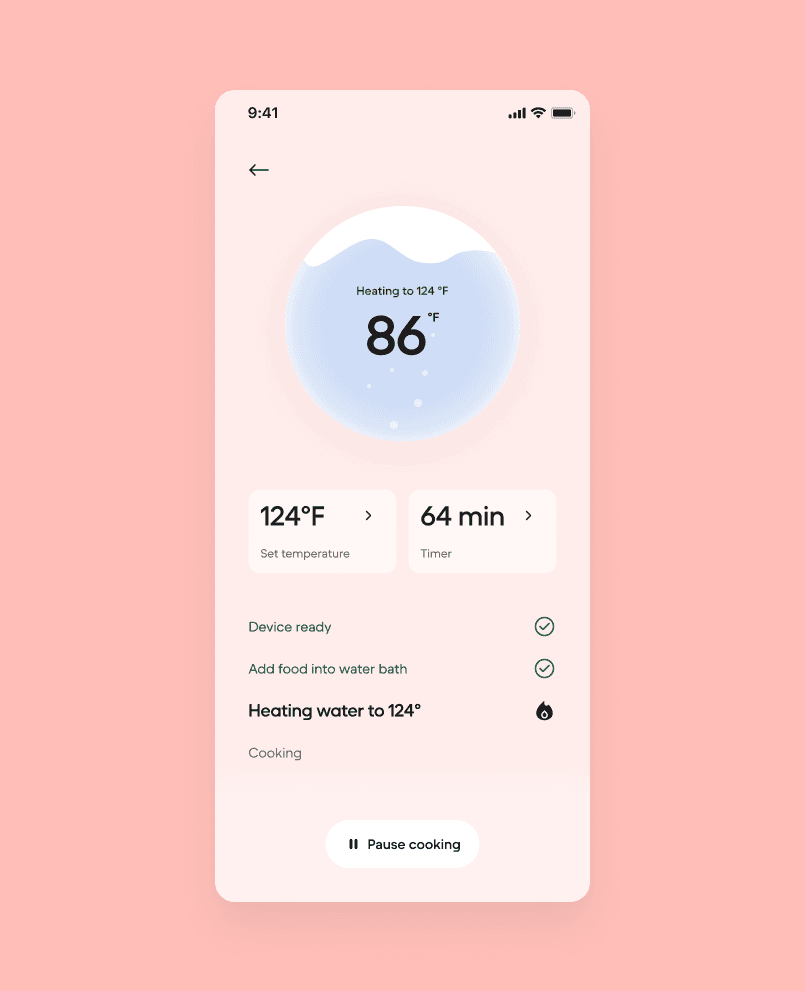
I used a water evaporation animation as the central visual element of the cooking controls. As the timer counts down and the cook progresses, the animation reinforces what's physically happening with the device. It provides a sense of progress without requiring users to interpret abstract data points.
Concept design - evolution
Early exploration
Used circle shape to mimic the Anova hardware's timer screen.

Mid exploration
Playing with water bubble as core concept
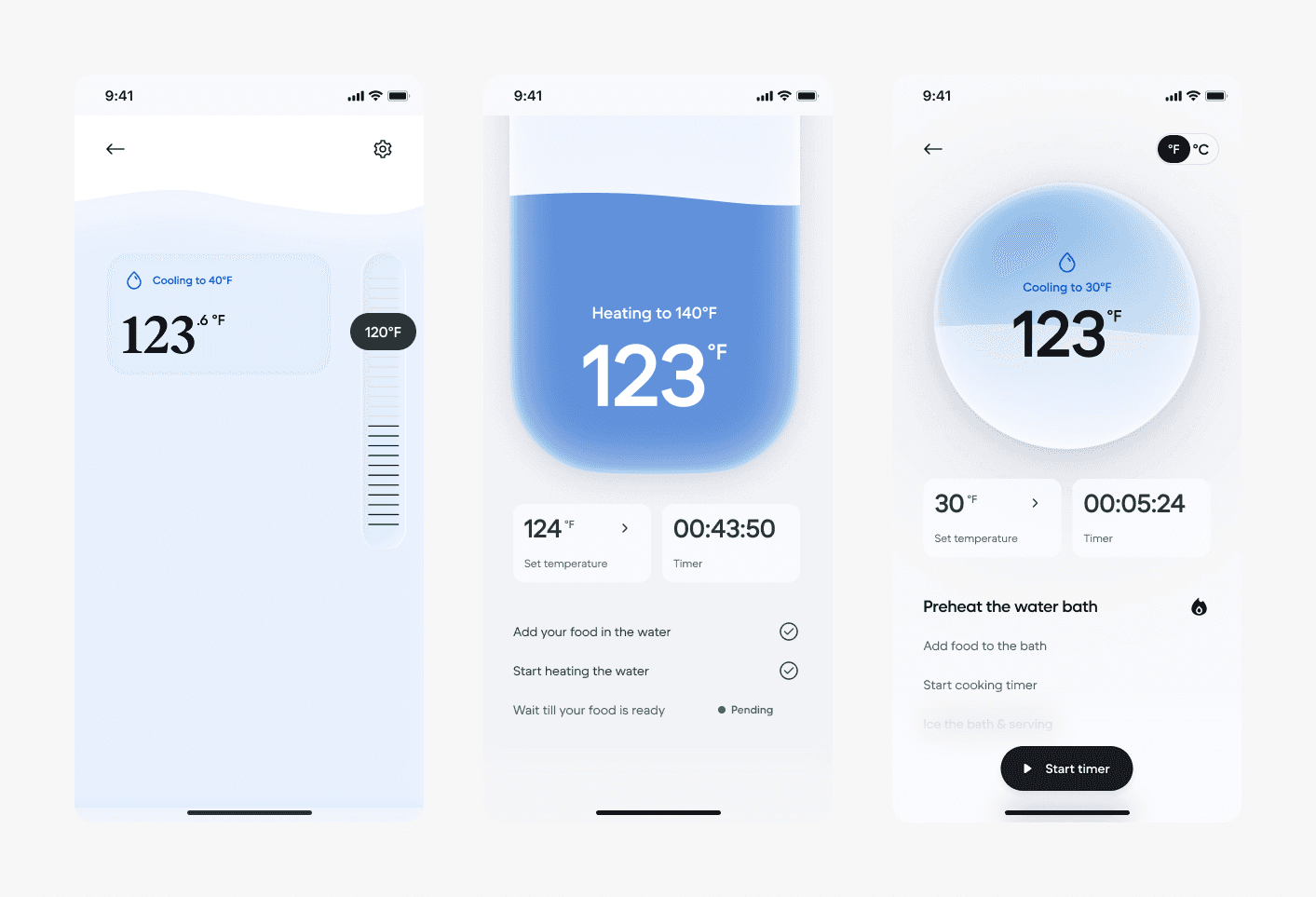
Late exploration
Solidified the wave inside the circle idea, trying how to show various states.

Final design.
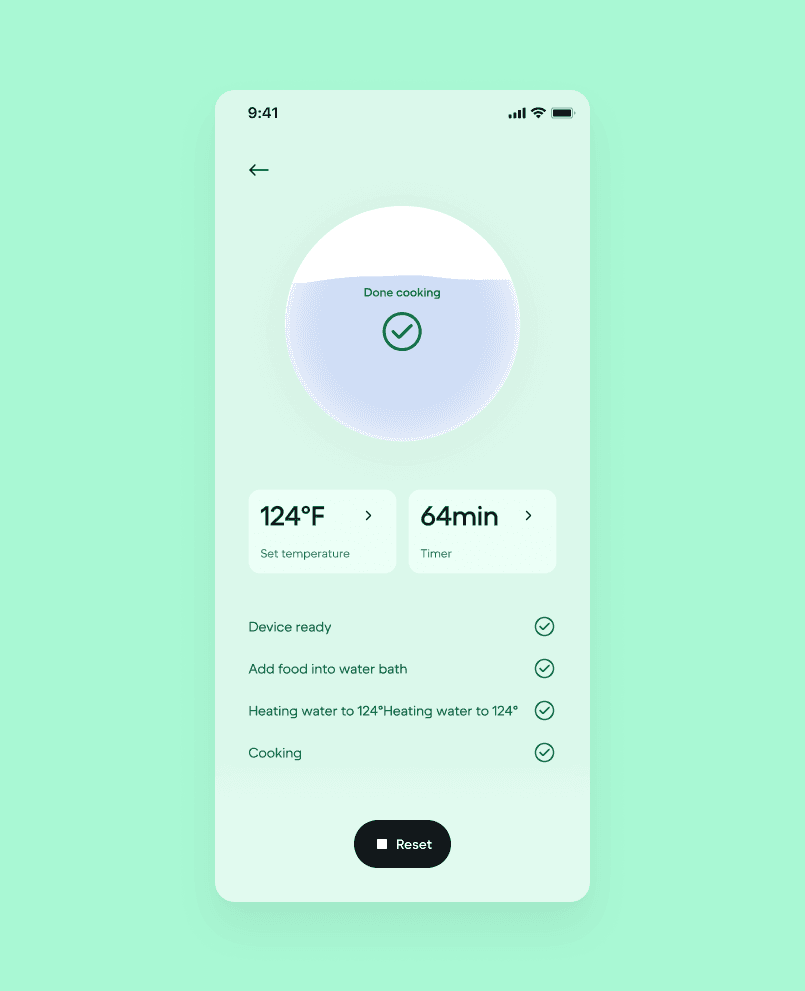
The control screens follow a clear hierarchy. Temperature is the dominant element — large and central. Timer sits as the secondary element. Status changes (heating, maintaining, complete) are communicated through color shifts: warm tones during active cooking, green on completion.
DESIGN DECISION 03
Making the obsolescence narrative tangible through UX writing and visual design.
The app wasn't only a cooking tool. It was also an argument — every touchpoint needed to reinforce the idea that this device was abandoned and has been brought back.
On the UX writing side, the onboarding flow contextualizes the moment of connection. Headers and microcopy acknowledge the device's history, framing the pairing process as restoration rather than standard setup. The language positions the user as participating in something with purpose.
On the visual design side, the treatment borrows from Back Market's brand identity but introduces softer, more organic elements that signal renewal. The aesthetic sits between a modern tech product and something more considered — trustworthy enough to feel functional, warm enough to feel intentional.
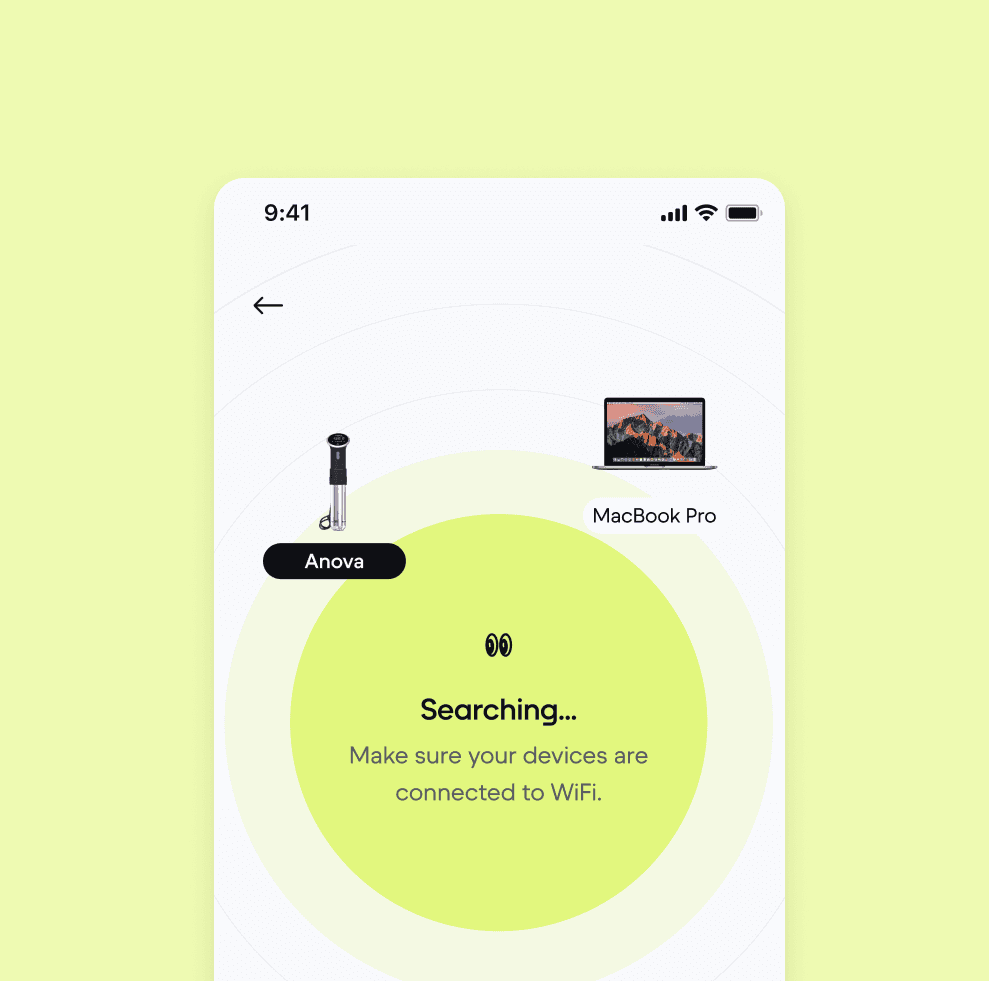
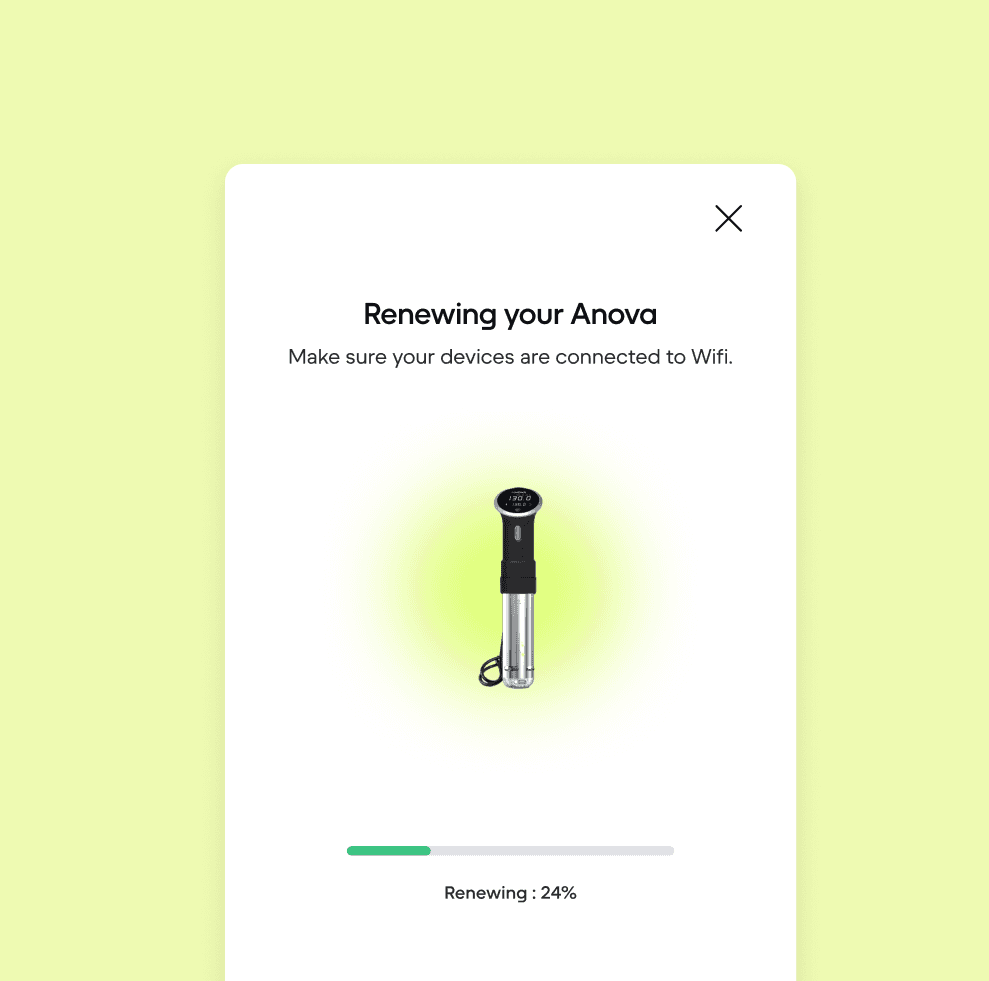
This layer was especially important because the primary audience at the forum was press and industry, not end users. The UX needed to communicate the story on its own, even during a quick booth walkthrough.
PRODUCT FLOW
From device discovery to a finished cook — the full user journey.
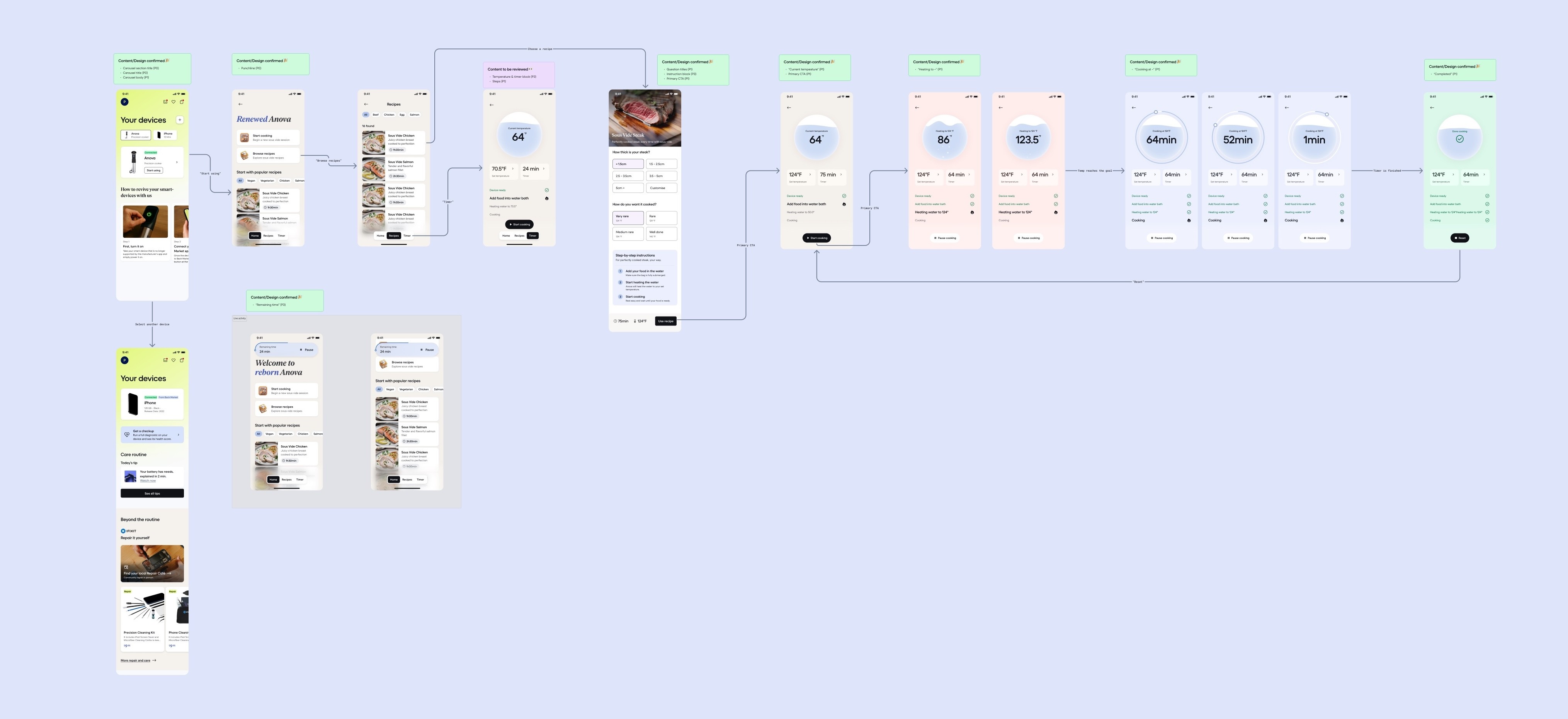
The journey begins in the Back Market app's "Your Devices" section, where the user initiates device restoration. The onboarding flow guides them through Bluetooth pairing with clear, step-by-step instructions, acknowledging that the original app for this device no longer exists.
Once connected, the user enters a recipe-driven experience. Rather than presenting a raw temperature and timer input, the app offers curated recipes as the default path. This lowers the barrier for users who may not be experienced with sous vide, and gives the product enough surface area to feel complete.
Selecting a recipe pre-fills the temperature and time settings. The user confirms and starts the cook. The interface transitions into the monitoring state — water evaporation animation, real-time temperature, and countdown timer. Status changes are communicated through both the animation and color transitions across the heating, maintaining, and completion phases.
The cook ends with a clear completion state.
OUTCOME
Presented at the forum. Covered in press. Opened a new conversation internally.
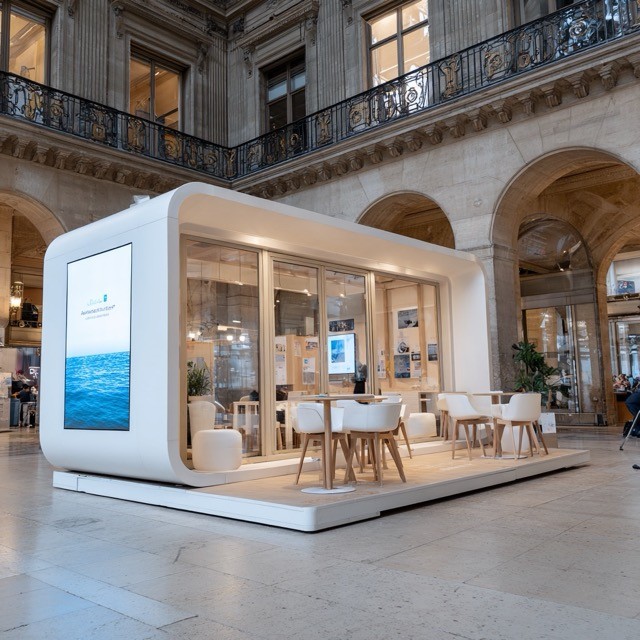
The app was demoed live at Back Market's booth at the Paris tech media forum. My product manager presented it to press and attendees. The reception was strong — an article was written about the initiative, extending the software obsolescence message beyond the event itself.
The demo resonated as a credible, working proof of concept. It moved the conversation from identifying software obsolescence as a problem to showing what a response could look like in practice.
Internally, the project reinforced the insight that software obsolescence remains largely unaddressed as a market opportunity. Hardware refurbishment is established; the software side is still open. This concept contributed to ongoing thinking about where Back Market's sustainability mission could expand next.
REFLECTION
What I'd push further, and what this project clarified.
With more time and resources, I'd want to conduct user research with actual Anova owners whose devices lost software support — their specific frustrations would sharpen the onboarding narrative. I'd also explore expanding beyond a single device into a broader library of abandoned smart products, which is where the real platform potential lives. And I'd run usability testing on the cooking flow to validate whether the information hierarchy holds under actual cooking conditions.
This project clarified something for me about the nature of design work at the concept stage. The app didn't need to scale to millions of users. It needed to make an idea legible — to walk into a room and help people understand, in under a minute, why software obsolescence matters and what addressing it could look like.