" width="544.0252304077148px"><path d="M 134.25 0 C 208.394 0 268.5 60.106 268.5 134.25 C 268.5 208.394 208.394 268.5 134.25 268.5 C 60.106 268.5 0 208.394 0 134.25 C 0 60.106 60.106 0 134.25 0 Z" fill="rgb(1, 20, 24)" height="268.5px" id="yN8vm1Hrx" transform="translate(138 136.58)" width="268.5px"/><path d="M 0 20.006 C 0 8.957 8.957 0 20.006 0 L 20.006 0 C 31.055 0 40.013 8.957 40.013 20.006 L 40.013 60.019 C 40.013 71.068 31.055 80.025 20.006 80.025 L 20.006 80.025 C 8.957 80.025 0 71.068 0 60.019 Z" fill="rgb(1, 20, 24)" height="80.02523046666083px" id="shHSoeOt9" transform="translate(252 0)" width="40.01261523333051px"/><path d="M 0 20.006 C 0 8.957 8.957 0 20.006 0 L 20.006 0 C 31.055 0 40.013 8.957 40.013 20.006 L 40.013 60.019 C 40.013 71.068 31.055 80.025 20.006 80.025 L 20.006 80.025 C 8.957 80.025 0 71.068 0 60.019 Z" fill="rgb(1, 20, 24)" height="80.0252304666609px" id="f_wgo_K4w" transform="translate(252 480)" width="40.01261523333051px"/><path d="M 70.733 42.44 C 78.546 50.253 78.546 62.92 70.733 70.733 L 70.733 70.733 C 62.92 78.546 50.253 78.546 42.44 70.733 L 14.147 42.44 C 6.334 34.627 6.334 21.96 14.147 14.147 L 14.147 14.147 C 21.96 6.334 34.627 6.334 42.44 14.147 Z" fill="rgb(1, 20, 24)" height="84.87957469348834px" id="yd7tGmc9p" transform="translate(399.513 400.699)" width="84.87957469350249px"/><path d="M 70.733 42.44 C 78.546 50.253 78.546 62.92 70.733 70.733 L 70.733 70.733 C 62.92 78.546 50.253 78.546 42.44 70.733 L 14.147 42.44 C 6.334 34.627 6.334 21.96 14.147 14.147 L 14.147 14.147 C 21.96 6.334 34.627 6.334 42.44 14.147 Z" fill="rgb(1, 20, 24)" height="84.87957469348827px" id="L5H_XKlqs" transform="translate(60.412 75.598)" width="84.87957469350272px"/><path d="M 0 20.006 C 0 8.957 8.957 0 20.006 0 L 60.019 0 C 71.068 0 80.025 8.957 80.025 20.006 L 80.025 20.006 C 80.025 31.055 71.068 40.013 60.019 40.013 L 20.006 40.013 C 8.957 40.013 0 31.055 0 20.006 Z" fill="rgb(1, 20, 24)" height="40.01261523333062px" id="u2pqvCVt4" transform="translate(464 260) rotate(180 40.013 20.006)" width="80.02523046666101px"/><path d="M 0 20.006 C 0 8.957 8.957 0 20.006 0 L 60.019 0 C 71.068 0 80.025 8.957 80.025 20.006 L 80.025 20.006 C 80.025 31.055 71.068 40.013 60.019 40.013 L 20.006 40.013 C 8.957 40.013 0 31.055 0 20.006 Z" fill="rgb(1, 20, 24)" height="40.01261523333039px" id="aMBcd6Ugf" transform="translate(0 260) rotate(180 40.013 20.006)" width="80.02523046666079px"/><path d="M 42.44 14.147 C 50.253 6.334 62.92 6.334 70.733 14.147 L 70.733 14.147 C 78.546 21.96 78.546 34.627 70.733 42.44 L 42.44 70.733 C 34.627 78.546 21.96 78.546 14.147 70.733 L 14.147 70.733 C 6.334 62.92 6.334 50.253 14.147 42.44 Z" fill="rgb(1, 20, 24)" height="84.87957469348827px" id="e3VHiSnuY" transform="translate(392.513 75.598)" width="84.87957469350249px"/><path d="M 42.44 14.147 C 50.253 6.334 62.92 6.334 70.733 14.147 L 70.733 14.147 C 78.546 21.96 78.546 34.627 70.733 42.44 L 42.44 70.733 C 34.627 78.546 21.96 78.546 14.147 70.733 L 14.147 70.733 C 6.334 62.92 6.334 50.253 14.147 42.44 Z" fill="rgb(1, 20, 24)" height="84.87957469348834px" id="lsZHVEVAz" transform="translate(60.412 400.699)" width="84.87957469350272px"/></g></svg>)

Building AI-native design system
Built a comprehensive Storybook design system for an AI SaaS product, defining components, tokens, and patterns to keep a fast-moving product visually and functionally consistent.
Category
SaaS
Dates
May 2026 - July 2026
Market
Japan
Role
Product Designer
CHALLENGE
Two products with no foundation
The company had already launched two products : AI-augmented deliverable generation tool & project management tool. However the two products shared no coherent system, which resulted in fragmentation, slow feature delivery, and a lot of tech & UX debt.
GOAL
Establish a design system that supports fast, credible product growth.
At a startup, the design system should support product velocity, not control it. When I joined, the company was in a scale phase, which demanded fast, evolving product growth without sacrificing the trust and credibility users depend on.
APPROACH
AI-driven flow to design a scalable system in less than 2-months
Step. 1
Audit using AI tools
Used Devin to audit existing tokens and component pattern to map overlaps, conflicts, and usage frequency of each component.

Step. 2
Re-built foundation
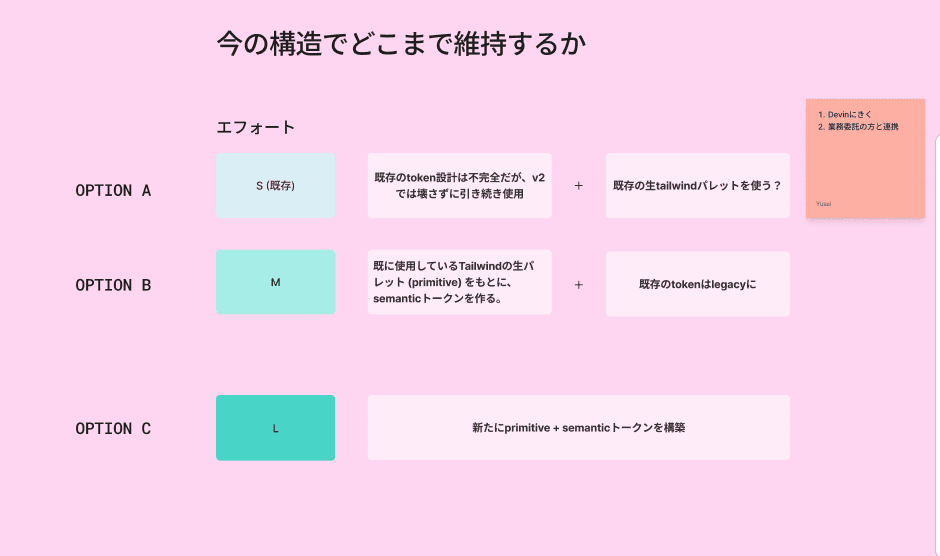
Defined two-layer semantic tokens system (color, spacing, radius, typography) before building any new components. I used Figma to define this stage for better visibility.
Step. 3
Framework decision with engineers
Collaborated with engineers to decide on governance of the new design system given the limited resource. For devoper frinedliness, we decided to use headless UI and tailwind for FE.

Step. 4
Component buildingion the brief before you accept it.
Designed main components needed to maintain existing functions. To fasten process we used headless UI for dev, Figma <> Cursor for design.

Key decision 01
Utilize “slot” to allow flexibility in components

Figma
Figma’s new feature that allows consumers to swap content dynamically without creating many variants. Used for card elements.

Code
Used as <children> prop - pass React nodes and the component wraps them in its own markup.
Key decision 01
Utilize “slot” to allow flexibility in components

Figma
I used Figma to define foundation tokens such as colors and typography as well as default styling of components that are shared across many common components.

Cursor
Once I defined semantic tokens and overall styling, I used Cursor to centralize all components source in Storybook. Developers then reference this to clone the repo to build proper code.
OUTPUT
Building Storybook as a designer
Typography
Used “Gen Interface JP” for clean, and consitent look for Latin+JA character display,

Color
I used two layers (raw + semantic) to allow scalable and consistent token governance.

Spacing
Ruled by common numbers of 2 mixed with industry standard.

Radius
Ruled by common numbers of 2 mixed with industry standard.

Components
I used two layers (raw + semantic) to allow scalable and consistent token governance.

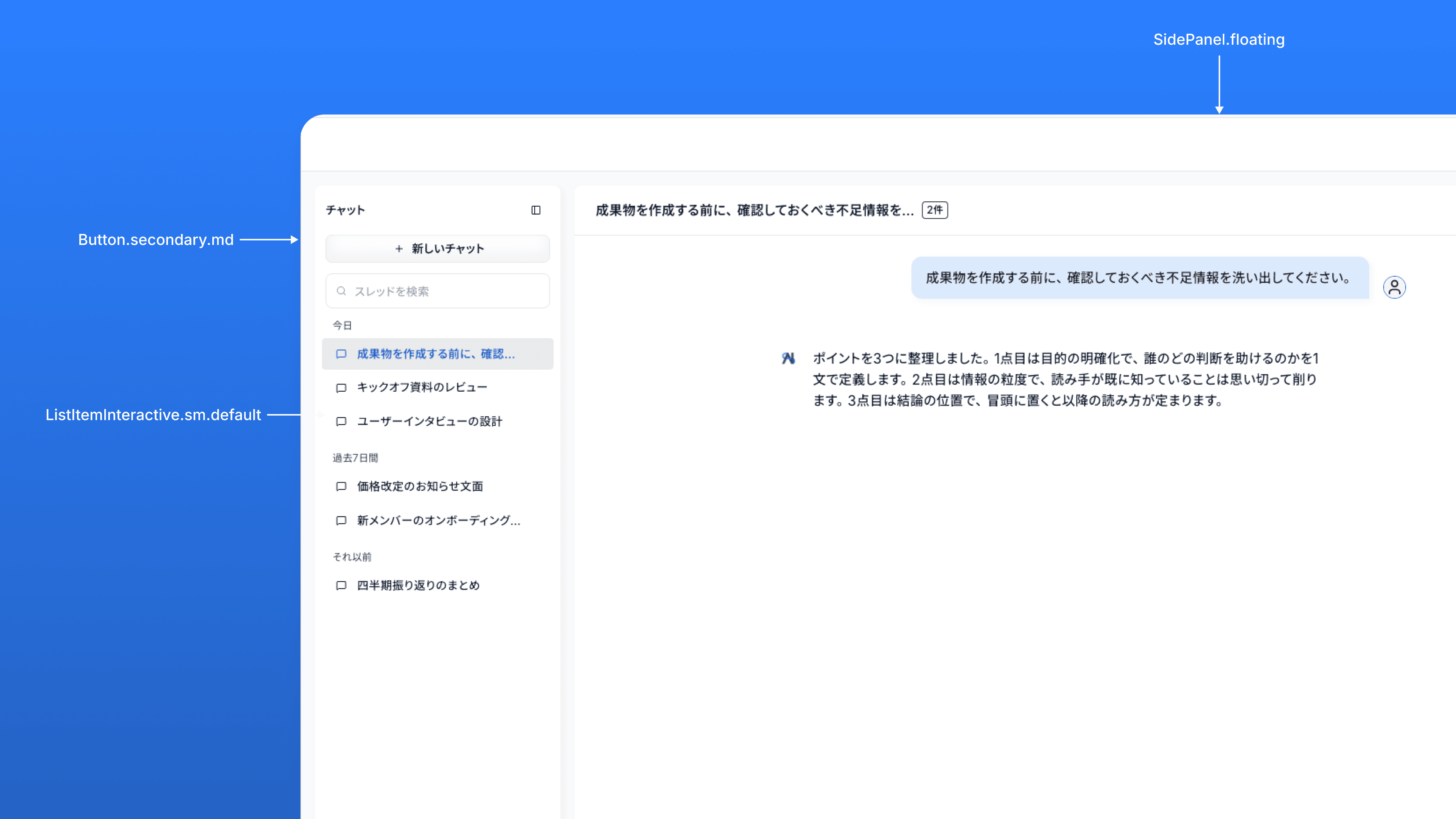
Use case example : chat interface
Use case example : draft screen

RESULTS
System where anyone can prototype with consistency
The business requires a fast-pace adaptation to stay in the competitive AI-augmented SaaS industry. This system I built in is now being used by non-designers to quickly build prototype, making alignments much faster and efficient.
Create a dashboard for our next product.
Thinking…
Design system
Generate